You’ve been playing with Swagger and can now see the benefits, and you are planning to use a YAML file, now you would like to display it to the outside work, here is a short article explaining all that is required. This is based on you using Express within Node.js
Once you have installed swagger into your application, using this command:
npm install -g swagger To edit you active YAML file just type to following:
swagger project edit
What is Swagger? On the Swagger site we can find the definition of Swagger:
Swagger is the world’s largest framework of API developer tools for the OpenAPI Specification(OAS), enabling development across the entire API lifecycle, from design and documentation, to test and deployment.
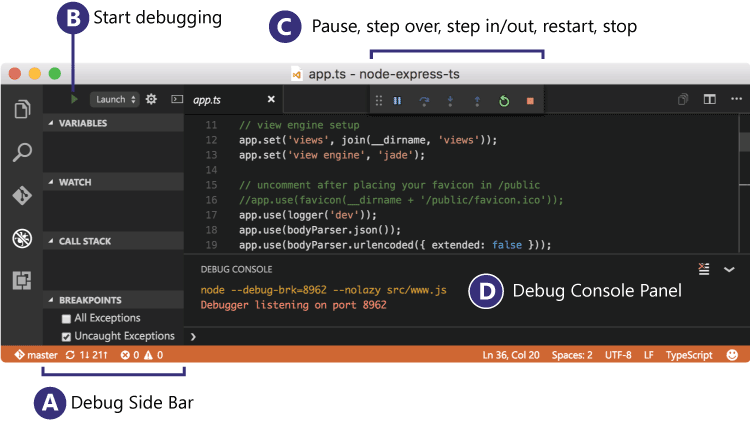
no need for me to explain what to do when Microsoft already has a very good article on debugging within Visual Studio Code
https://code.visualstudio.com/docs/editor/debugging
Before we start let’s just ask a few questions:
Why Typescript? There are two main goals of TypeScript:
Provide an optional type system for JavaScript. Provide planned features from future JavaScript editions to current JavaScript engines
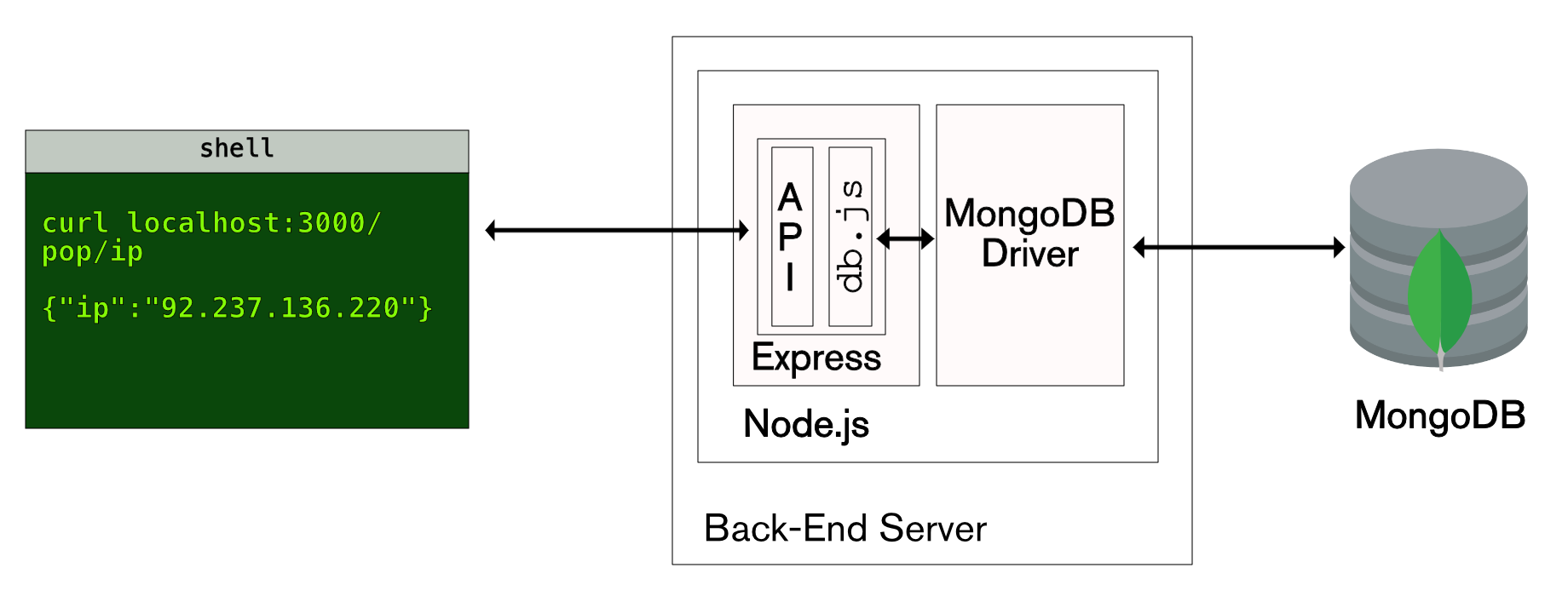
Here is a short article to provide a simple RESTful API using node.js.
Why use node.js? node.js is super fast and handles asynchronous without having to think about coding, it is javascript based and runs on such a small footprint that it is just the way things should be.
A clear rejection is always better than a fake promise, so when dealing with Promises in Node.JS consider the rejection aspect of the promise.
It is quite easy to handle, I prefer the Async method of handing promises, as it is much easier to read and understand.
With Node.js you have the ability to make promises, but what is a promise?
Here is a definition of a node.js promise
‘A promise is an abstraction for asynchronous programming. It’s an object that proxies for the return value or the exception thrown by a function that has to do some asynchronous processing’
Node.js is a very powerful platform for building server-based applications.
I have put together a list of very useful links which help with building and working with Node.js
Download link for installing Node.js, or use Homebrew
MSMQ (Microsoft Message Queuing) is a message queue that is available by default as part of Windows. A reliable way of sending and receiving messages across computer systems, MSMQ provides a queue that’s scalable, thread-safe, simple, and convenient to use while at the same time providing you with the opportunity to persist the messages inside the Windows database.
There are a number of best practices when it comes to Async what I’ll try and cover here are the “guidelines” than actual rules. There are exceptions to each of these guidelines. The guidelines are summarised in the table below.
Summary of Asynchronous Programming Guidelines
The problem? How can application A, handle events sent by an application B, and how to implements those events in B? Knowing that B has no idea of the existence of A.
The MemoryMapped way The following example shows how it would work, with the restriction that both applications are using the same memory space. In real code, the producer() method would be in a different application from the consumer() method, but this serves to illustrate an implementation:
Procedure & Rules An important element of Scrum is to estimate the complexity of features in the product backlog. For the estimation process, we use a simplified Fibonacci sequence: 0, 1, 2, 3, 5, 8, 13, 20, 40, 100.
Your software team has a process that use to complete work. Normalizing that process–i.e., establishing it as a workflow–makes it structured and repeatable, which, in turn, makes it scalable. With your development team, you can take an iterative approach to workflow management because it helps you meet your goals faster and exemplifies your team culture.
It is sometimes useful to know which database you are connected to, here is a simple method that pulls apart the connection string and provides you with the section you request.
private static string GetSection(string section) { var connectionString = string.Empty; Configuration rootWebConfig = System.Web.Configuration.WebConfigurationManager.OpenWebConfiguration("/MyWebSiteRoot"); ConnectionStringSettings connString;
if (rootWebConfig.ConnectionStrings.ConnectionStrings.Count > 0) { connString = rootWebConfig.ConnectionStrings.ConnectionStrings[“Entities”]; if (connString != null) connectionString = connString.ConnectionString; }
string[] parts = connectionString.Split(’;’);
for (int i = 0; i < parts.Length; i++) { string part = parts[i].Trim().ToLowerInvariant(); if (part.StartsWith($"{section}=")) { return part.Replace($"{section}=", “”); } }
return “Unknown”; }
The 3 equal signs mean “equality without type coercion”. Using the triple equals, the values must be equal in type as well.
0 == false // true 0 === false // false, because they are of a different type 1 == "1" // true, automatic type conversion for value only 1 === "1" // false, because they are of a different type null == undefined // true null === undefined // false '0' == false // true '0' === false // false
Install ASP.NET and Web Tools 2012.2 Update. This update integrates help pages into the Web API project template.
Next, create a new ASP.NET MVC 4 project and select the Web API project template. The project template creates an example API controller named ValuesController. The template also creates the API help pages. All of the code files for the help page are placed in the Areas folder of the project.
If you are serious about using SOAP, it won’t be long before you find out that if you need a full ISO date in the XML, it will not work using C# and SOAP, as DateTimeOffset is not supported from Microsoft.